
Why LED Flickers: The Complete Buyer’s Guide (Causes, Diagnostics & Fixes)
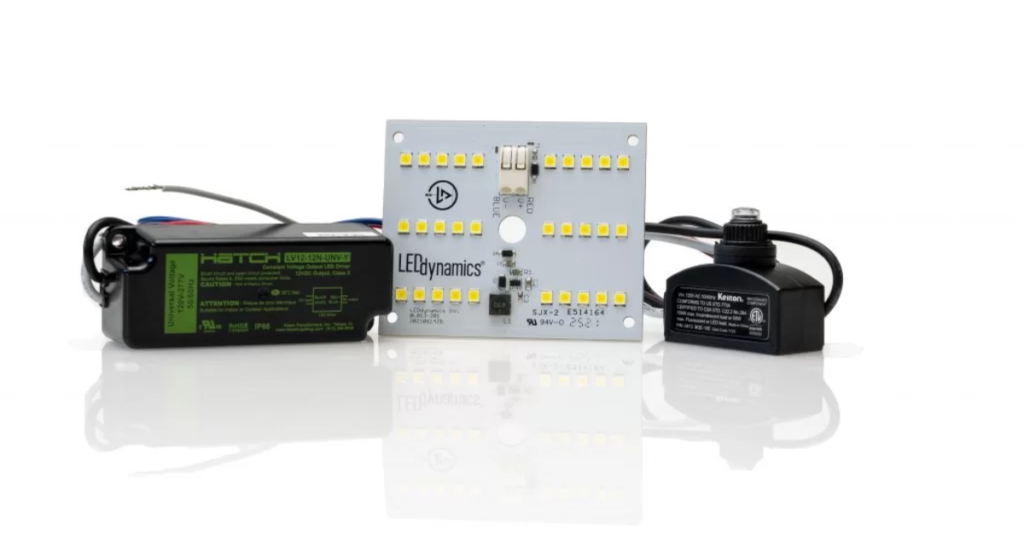
Flicker is the number-one annoyance people report about LEDs — a subtle strobe here, a cursor shimmer during video calls there. Suppose you’ve asked why LED flickers, you’re not alone. The good news is that most flicker problems are diagnosable and fixable. This guide provides a highly practical, product-oriented explanation of the causes, how to test for flicker, what specifications to demand when buying replacements, and clear step-by-step solutions a buyer or installer can use. Quick summary — the short answer to why LED flickers LEDs flicker because something in the electrical chain makes their power supply unstable. The most common reasons are: Later sections explain how to identify which of these is the problem in your installation and what to do about it. How LED light sources work (so flicker makes sense) Understanding why LED flickers starts with how LEDs are driven. An LED itself is a diode that needs DC. Household power is AC (mains). An LED fixture includes a driver that converts AC → DC and controls current (constant current drivers) or voltage (constant voltage drivers). If that conversion is unstable, the LED’s light output changes rapidly — that’s flicker. There are two common electronic reasons for visible flicker: So when you ask why LED flickers, think “what is happening to the current the LED receives?” Common causes explained (detailed) 1. Poor-quality or failing LED drivers Many LED flicker cases boil down to the driver. Cheap drivers often have inadequate smoothing capacitors, poor thermal design, and weak surge protection. A failing driver may produce intermittent DC or a strange ripple, causing flicker. The best way to avoid this is to use drivers from reputable manufacturers with clear specs about ripple, flicker percentage, and L70 life. 2. Dimmers and dimmer-driver incompatibility Dimming technologies include phase-cut (triac / leading-edge), trailing-edge (ELV), 0–10V, DALI, and PWM. If your dimmer’s waveform and the driver’s expectancies don’t match, you get flicker, buzzing, or a limited dimming range. Legacy dimmers built for incandescent loads often fail with modern LED lamps. 3. PWM frequency and flicker index Some LED drivers dim using PWM. If that PWM operates at low frequency, the light can show visible flicker or interact with camera shutter speeds. Good drivers use high-frequency PWM (tens of kHz) or other techniques to minimize visible flicker. 4. Mains instability & voltage dips In some areas, mains voltage can fluctuate due to heavy loads or grid disturbances. LEDs driven near their supply limits can dip or strobe when the mains sags — another reason to select drivers with wide input ranges and good ride-through capability. 5. Loose wiring & poor terminations A flicker that is intermittent and correlates with knocks or vibrations often means a loose connection — at the lamp-holder, switch, connector, or neutral. Loose neutrals are particularly dangerous and can cause erratic brightness and appliance damage. 6. Incompatible transformers for MR16/MR11 fixtures Many retrofits replace halogen MR16s (12V) with LED MR16s but leave in place a magnetic or electronic transformer designed for halogen. LED MR16s require LED-compatible transformers or a direct LED driver; otherwise, you’ll often ask why LED flickers. 7. Interaction with electronic devices or dimmers on the same circuit High harmonic content from other loads (variable-frequency drives, HVAC, heavy machinery) can pollute the mains and create flicker in sensitive LED drivers. How to measure flicker (practical tests) If you want to be systematic about why LED flickers, try these tests and tools. Simple visual & camera tests Basic electrical tests Instruments for professional diagnosis Good commercial drivers list flicker specs (e.g., flicker <5% or flicker index <0.02). When you shop for replacements, demand that number. How visible is flicker? Metrics explained Not all flicker is equally noticeable. Manufacturers use metrics: When reviewing specs, ask for flicker percent, flicker index, and PWM frequency where applicable. Step-by-step troubleshooting: fix flicker fast Here’s a practical checklist for people asking why LED flickers in their home or office. These steps will answer most “why LED flickers” questions quickly. Product-oriented buying checklist — demand these specs When you replace a lamp or driver, use this copy-paste checklist so you don’t end up with another flicker: Buying with these specs dramatically reduces the chance you’ll still be asking why LED flickers after installation. Fix examples & practical solutions Case A: Flicker only when dimming (triac dimmer) Fix: Replace with an LED-compatible trailing-edge dimmer, or swap to a driver that explicitly supports phase-cut dimming. Some LED lamps also include circuitry to emulate a minimum load (but this is a workaround, not ideal). Case B: Flicker across multiple fixtures on the same circuit Fix: Suspect mains instability or shared neutral issues. Get an electrician to check panel loads and wiring. Consider drivers with better EMI filtering and surge protection. Case C: MR16 LED flickers with the existing halogen transformer Fix: Replace the magnetic or electronic transformer with an LED-compatible constant-voltage driver, or use LED lamps specified to work with the existing transformer (rare). Case D: Flicker only in video/camera footage Fix: Use lamps with high PWM frequency or flicker-free drivers. Many “flicker-free” lamps are optimized for broadcast and camera use and list PWM frequency >10 kHz. When flicker is a health concern Persistent flicker can cause headaches, eye strain, and, in sensitive individuals, may trigger migraine or photosensitive epilepsy. If anyone in the space is sensitive, adopt stringent criteria: flicker <1–3% and flicker index as low as possible. Don’t dismiss complaints — take them seriously and act. Long-term prevention: design choices that stop flicker before it starts Good upfront design prevents the “why LED flickers” question entirely. Example RFQ language to remove ambiguity When buying replacements, paste this into supplier requests: “Quote LED downlight or driver with measured flicker ≤ 3% (provide test report), flicker index and PWM frequency specified, dimming compatibility: triac/ELV and 0–10V, input 100–277 VAC, output CC 700 mA, wattage 20 W, PF ≥ 0.9, 5-year warranty. Include datasheet and compatibility list for dimmers.” This forces suppliers to show data — no guesses. Final
Why LED Flickers: The Complete Buyer’s Guide (Causes, Diagnostics & Fixes) Read More »