
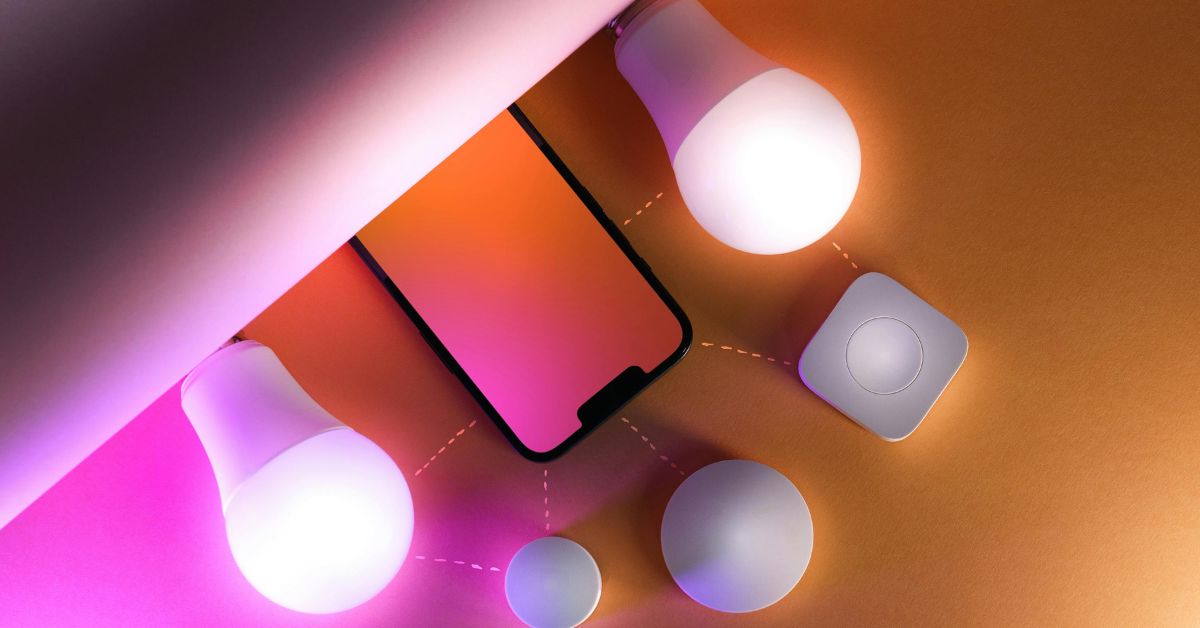
Smart lighting turns ordinary rooms into flexible, comfortable places: wake-up scenes in the bedroom, hands-free arrival lights at the front door, and perfectly dimmed movie evenings. This guide explains everything a new buyer needs to know about smart lights for home — from the basics of bulbs, strips and fixtures to the network choices (hub, hubless, or hybrid), how to avoid compatibility and dimming headaches, energy and lifetime trade-offs, privacy and security, and a step-by-step shopping checklist you can copy to suppliers.
I’ll keep things practical and product-oriented: the exact numbers to look for, compatibility questions to ask, and how to test a sample before buying in bulk. If you’re building a smart-lighting setup or upgrading a few lamps, this is the blueprint.
Why pick smart lights for home?
Smart lights are more than convenience. The right setup:
- Saves energy by scheduling and dimming.
- Improves safety with presence and away scenes.
- Enhances mood and function with scenes (wake, cook, read, relax).
- Integrates with voice assistants and home sensors for automation.
- Lets you control lights remotely and monitor usage.
If you’re buying smart lights for home, think in terms of systems and use cases: do you want a handful of app-controlled bulbs or a whole-house, professionally-managed lighting system? Your answer drives hardware, network and budget decisions.
Types of smart lights (and where they belong)
When shopping for smart lights for home, you’ll encounter several hardware families. Choose the type by use-case and location.
Smart bulbs (A19, BR30, GU10)
- Screw-in or plug-in bulbs that replace existing lamps.
- Good for fast retrofits and lamps.
- Pros: cheap per unit, easy to test. Cons: visible base in recessed trims, power must stay on for smart features.
Smart LED strips (flexible, 24V or 12V)
- Under-cabinet task lighting, coves, and shelves.
- Pros: continuous linear light, tunable white and RGB options. Cons: need drivers and channels, careful power planning.
Smart downlights & integrated fixtures
- Purpose-built fixtures with integrated LEDs and drivers.
- Pros: clean aesthetics, higher efficacy. Cons: more permanent; check driver replaceability.
Smart pendants and decorative fixtures
- For dining and living areas, often include dim-to-warm or tunable-white tech.
- Choose if you want design + smart control.
Smart switches & relays (hardwired)
- Replace wall switches to make standard (non-smart) lights smart.
- Ideal when you want traditional switches to remain operational while adding smart control.
Smart plugs
- Convert table lamps and appliances into smart devices.
- Useful for lamps with incompatible bulbs or for a simple remote control.
Each of these options fits different budgets and technical comfort levels. Many homes combine types (bulbs in lamps + strips in kitchens + hardwired fixtures in main zones) to get the best coverage.
Protocols: how smart lights talk (and why it matters)
A key part of picking smart lights for home is the control protocol. The main choices are:
Wi-Fi (hubless)
- Bulbs or fixtures join your Wi-Fi network.
- Pros: no extra hub; direct cloud or app control.
- Cons: Wi-Fi congestion if you have many bulbs; higher standby power for always-connected devices.
Bluetooth / Bluetooth Mesh (hubless or with a gateway)
- Good for small setups or phone-based control; mesh improves range.
- Pros: lower power, no router hops. Cons: may require a bridge for remote control.
Zigbee / Thread / Z-Wave (mesh, requires hub or smart speaker bridge)
- Mesh networks are specially designed for smart home devices.
- Pros: reliable, efficient, scales well, local control possible.
- Cons: needs a hub or compatible smart speaker (gateway).
DALI / 0–10V / KNX (wired, professional)
- For advanced, commercial-grade control — addressable lighting & diagnostics.
- Use in whole-house or multi-room projects where installers prefer wired reliability and centralised control.
Pro tip: If you plan many devices, prefer mesh (Zigbee/Thread) or wired control; for a few lamps, Wi-Fi or Bluetooth is fine. Whichever protocol you choose, keep it consistent across zones to avoid fragmentation.
Hub vs hubless: which should you pick?
Hubless (Wi-Fi / Bluetooth)
- Best if you want a quick set-up and a few lights.
- Pros: easy to install; no extra hardware.
- Cons: each bulb is a standalone device — large numbers can strain Wi-Fi and cause latency.
Hub-based (Zigbee / Thread + gateway)
- Best for many lights, reliability, and local execution.
- Pros: devices form a mesh, better reliability and lower latency; hubs give central automation and diagnostics.
- Cons: upfront hub cost and slightly more setup.
Hybrid: many homeowners use a hub (e.g., Zigbee) for fixed lighting and Wi-Fi bulbs for occasional lamps, bridging them via the smart home platform.
If you expect to expand beyond a handful of lights, start with a hub-based mesh system to avoid rework.
Voice assistants and ecosystems — choose your smart home brain
Smart lights usually integrate with voice assistants — choose one primary ecosystem and use devices certified for it. Popular ecosystems include Amazon Alexa, Google Home, and Apple HomeKit; each has strengths (routine support, local execution, privacy model). Pick the primary hub or voice assistant before buying — it helps avoid incompatible devices and duplicate apps.
Practical buying checklist for smart lights for home
Use these product-oriented criteria when evaluating devices:
- Protocol: Zigbee / Thread / Wi-Fi / Bluetooth — match to your plan.
- Power & Efficacy: lumens and lm/W (efficacy) — higher is better.
- CCT & CRI: tunable white support? CRI ≥ 90 for kitchens and art.
- Dimming: smooth down to 1%? dim-to-warm? triac/0–10V compatibility?
- Local control: Will basic scenes run without an internet connection?
- Security: manufacturer firmware updates & encryption.
- Driver replaceability: for integrated fixtures — can drivers be serviced?
- App & API: Does the platform expose an API for advanced automation?
- Warranty & spare parts: spares availability and support period.
Copy this checklist into your emails when requesting quotes for smart lights for the home to force suppliers to disclose technical details rather than marketing blur.
Installation & network planning (practical advice)
When adding smart lighting, plan both electrical and network infrastructure:
- Map zones first — decide rooms and scenes (e.g., kitchen task, kitchen ambient, hallway night).
- Decide protocol per zone — don’t mix wireless protocols in the same control group.
- Place the hub centrally — a Zigbee or Thread hub works best near the centre of device density to enable a robust mesh.
- Power planning for strips — calculate voltage drop and power injection points for long runs.
- Use smart switches for large fixtures — they preserve local control and allow non-smart bulbs to be used if needed.
- Label everything — devices, circuits and scripts — so troubleshooting is easy later.
A thoughtful plan avoids “smart islands” where a few lights are smart but the room still needs manual control.
Scenes, automations & useful use-cases
Smart lights shine when used with scenes and automations. Some practical examples for smart lights for the home:
- Wake-up scene: slow warm ramp for bedroom lights tied to alarm.
- Cooking mode: kitchen task lights on 100% neutral white, island pendants dimmer for ambience.
- Away security: randomised on/off schedule while you’re away, with motion sensors enabling path lights.
- Movie scene: dim living room in stages, closed shades, set TV lights.
- Night path: low-lux hallway lights triggered by motion after certain hours.
Design scenes before buying so you can ensure devices support the required behaviours (colour tuning, dimming resolution, delays, triggers).
Privacy & security — essential checks
Smart devices are networked devices. Minimise risk:
- Use a separate VLAN or guest Wi-Fi for smart devices.
- Change default passwords; use strong, unique credentials for hubs and cloud accounts.
- Check firmware update policies — prefer vendors with regular security updates.
- Avoid cloud-only dependencies for critical scenes (like path lights) — prefer local scene execution.
Privacy considerations are as important for smart lights for home as they are for cameras and voice assistants.
Energy, lifetime & troubleshooting
Smart lights are LEDs, so efficiency and lifetime are primarily LED attributes:
- Efficacy (lm/W): higher is better — good integrated fixtures commonly exceed 100 lm/W.
- L70 rating: target ≥ 50,000 hours for LED modules.
- Standby draw: smart bulbs and hubs draw standby power; for many devices, hub-based mesh uses less network standby than many Wi-Fi bulbs.
- Troubleshooting: typical issues include firmware mismatches, mesh weak spots, dimmer incompatibility, and Wi-Fi congestion. Always test a sample device in your setup before mass purchase.
A smart house will almost always save running energy through schedules and better control — but design your network to avoid excess standby waste.
Product recommendations & where to try (brands to explore)
When trying smart lights for home, visit showrooms and test real fixtures. Reputable manufacturers to start with include Philips for professional-grade tunable-white systems, IKEA for accessible smart bulbs and affordable integrations, LIFX for powerful Wi-Fi bulbs with good colour, and TP-Link Kasa for practical smart plugs and bulbs. For efficiency guidance and local energy programs, check the advice of the Bureau of Energy Efficiency if you’re in India.
(Each of these brands has different ecosystem strengths — test a device model in your home with your hub before committing.)
Maintenance & long-term tips
- Keep spare modules and bulbs from the same production batch to avoid colour shift.
- Document firmware versions and update schedules for hubs & devices.
- Wire drivers and hubs to UPS if you rely heavily on automation (e.g., elderly care path lighting).
- Schedule an annual check for mesh strength and device health.
Good maintenance prevents flaky behaviour and extends the value of your smart lighting investment.
Final checklist — before you buy smart lights for home
- Decide on your primary ecosystem (Alexa, Google, HomeKit) and stick to it.
- Choose protocol (Zigbee/Thread for many devices; Wi-Fi/Bluetooth for a few point devices).
- Map zones, scenes and controls before buying hardware.
- Test a sample device in situ with your network and hub.
- Ask for dimmer compatibility lists and flicker specs where relevant.
- Plan power and driver placement for strips and integrated fixtures.
- Create a separate network for IoT devices and enforce strong passwords.
- Keep spares and maintain firmware logs.